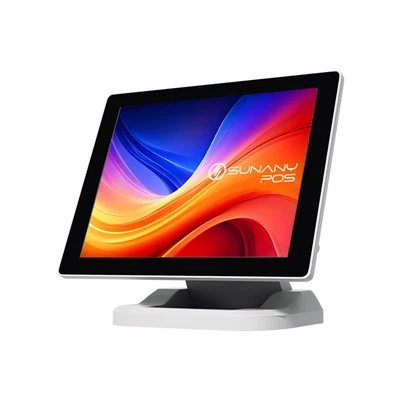
If you’ve ever stood in a grocery store checkout line, a fast-food drive-thru, or a retail shop’s point-of-sale (POS) counter, you’ve probably glanced at the small, angled screen perched right in front of the cashier. That’s a pole customer display—often called a pole display or customer-facing display (CFD)—a piece of hardware I’ve been supplying for over a decade. Over the years, I’ve lost count of how many customers have asked me a version of the same question: “Can this thing actually show my brand’s logo or custom images, or is it just for price totals?” Pole Customer Display
Today, I’m breaking down the answer—scientifically, honestly, and from the perspective of someone who’s installed, troubleshooted, and shipped hundreds of these displays across North America. No fancy jargon, no sales fluff, just what works, what doesn’t, and why your business might actually need custom branding on that tiny screen.
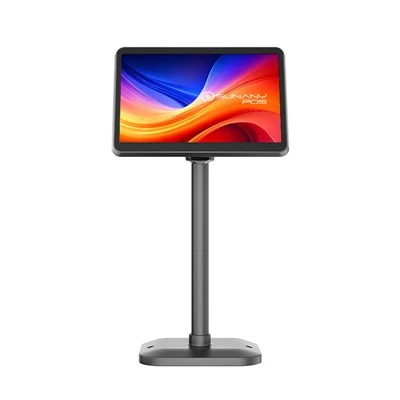
First, let’s get the basics right: what is a pole customer display, exactly? Unlike main POS screens that face the cashier, these are mounted on a vertical pole (hence the name) directly above or next to the POS terminal, angled perfectly so customers standing 1 to 3 feet away can read it. For years, their only job was functional: showing item prices, tax totals, change due, and payment confirmations. But as retail and quick-service restaurant (QSR) brands fight for every second of customer attention at checkout, that small screen has gone from a basic tool to a marketing touchpoint.
The short answer is: Yes, most modern pole customer displays can show logos, images, and custom messaging—but it depends on three key factors: the display’s hardware, its software compatibility, and your specific use case. Let’s dive into each, because this isn’t a one-size-fits-all scenario.
The Hardware Science: Can the Screen Resolve a Logo Clearly?
Let’s start with the most critical piece: the display’s resolution and display technology. Back in the 2000s, most pole customer displays were monochrome (only black and white) with a resolution of 16×16 pixels or less. Those were strictly for text—you couldn’t fit a recognizable logo, let alone an image, on that tiny grid. But today’s models are a whole different beast.
Most contemporary pole displays use one of two technologies: LCD (liquid crystal display) or LED (light-emitting diode). The best models for custom imaging have a resolution of at least 128×64 pixels. That’s small, but it’s more than enough to display a simplified version of a brand logo—think a circular logo, a wordmark, or even a small icon. A 128×64 pixel grid can fit around 10 characters of text side by side, plus a small graphic on top. For example, a coffee shop’s “bean and cup” logo? Scaled down to fit, it’s easily distinguishable on that resolution.
Wait, but what about higher resolutions? Some displays go up to 240×160 pixels, which is almost phone-sized in mini form. These are pricier, but they can show full-color images, product promotions, or even short animations (like a blinking “thank you” icon) without blurring. The tradeoff, of course, is cost and power: higher-resolution screens use more electricity, which isn’t a big deal for plug-in models but matters if you’re using a battery-powered pole display for mobile POS.
There’s a physical limit here, too: the size of the display. Most pole customer displays are between 2.4 and 7 inches diagonally. A 2.4-inch screen at 128×64 pixels is sharp enough for logos viewed from 2 feet away, which is the average checkout distance. A larger 7-inch screen at 240×160 pixels can display a full logo and a “10% off your next visit” message, making it ideal for QSRs where customers might wait longer at the counter.
I’ve seen too many customers buy a cheap, 16×16 monochrome display thinking they can load a logo, only to end up with a blocky, unrecognizable mess. That’s why I always ask potential buyers: “What’s the primary use case for your display?” If it’s just showing price totals, a low-res monochrome model works. If it’s for branding, a 128×64 or higher LCD/LED model is non-negotiable.
Software Compatibility: It’s Not Just About the Screen—It’s What You’re Running It With
Even if you have a high-resolution display, you can’t just plug it in and upload a logo out of the box. That’s another thing I explain to customers all the time: the pole display is a peripheral, not a standalone device. It works with your POS system, so your software has to support custom graphic uploads.
First, let’s talk about POS integrations. Most pole displays connect to POS systems via USB, RS232, or Ethernet. Older POS software (think pre-2015 basic cash registers) only lets you send text commands—so you can’t send an image file at all. But modern POS platforms, like Square for Retail, Shopify POS, Clover, and most restaurant management systems (RMS), have built-in support for custom pole display graphics. For these, you simply upload your logo file (usually a PNG or JPG, scaled to match the display’s resolution) through the POS’s admin dashboard, and it pushes to the display automatically.
There’s also the matter of how the display renders the image. Some displays come with built-in firmware that supports common graphic formats, while others require a custom driver. I’ve had clients with niche POS systems (like a small boutique’s legacy cash register) that needed a custom driver from my team to enable logo display. That’s a small extra step, but it’s doable—we’ve developed custom drivers for over 20 different POS platforms in the last 5 years alone.
Another point: real-time updates. If you want your pole display to show a rotating logo, a coupon, or a seasonal message (like a holiday promotion), your POS software has to trigger those changes automatically. For example, a pizza place might load a “Free Breadsticks With Order Over $20” graphic on Friday nights. That’s not just showing a static logo—it’s dynamic imaging. The good news is, most modern pole displays support both static and dynamic content, as long as the software can schedule or trigger those updates.
What Logos and Images Work Best (And What Doesn’t)
Now, let’s get practical: if you’re going to put a logo on your pole display, what will actually look good, and what will look like a blurry blob? I’ve tested hundreds of logos on different display sizes and resolutions, and there are a few hard rules here.
First, stick to simple, high-contrast designs. A logo with lots of tiny details, gradients, or thin lines will get lost on a small display. For example, a detailed illustration of a dog with fur texture won’t render well in 128×64 pixels. But a solid, bold wordmark (like “STARBUCKS” in a rounded font) or a simple icon (like McDonald’s golden arches) is perfect. High contrast is key: black text on a white background, or white text on a black background, is way more readable than a gradient or pastel colors.
Full-color images work on higher-resolution displays, but keep them small. You don’t need a 10-inch promotional graphic—keep it to 1-2 inches wide. For example, a convenience store might show a small image of a soda can next to the price, or a bakery might show a mini cupcake icon. Too large, and the image will stretch and lose clarity.
Also, consider viewing distance. As I mentioned earlier, pole displays are meant to be read from 1 to 3 feet away. If your logo is too small, customers will squint; if it’s too big, it’ll cut off at the edges. A good rule of thumb: scale your logo so it takes up about 30-50% of the display’s width. That’s the sweet spot for readability at checkout.
I once had a client, a boutique clothing store, that tried to upload their full-color, detailed shop logo on a 2.4-inch 128×64 display. It looked so blurry that customers asked if it was a glitch. We worked with their team to simplify the logo, stripping out all the tiny design details and making the text bold. Within a week, they told me 2 out of 5 customers commented that they liked seeing their logo on the checkout screen—something they never got from their old, text-only display.
The Practical Benefits Beyond Branding: Customer Experience and Transparency
Before I wrap this up, let’s talk about why a lot of my clients invest in custom pole display images, not just for logos. Sure, branding is a big one, but there are functional benefits too. For example, displaying a “thank you” message with your logo builds a friendly, memorable end to the customer’s shopping experience. Or, displaying a small coupon for a next visit (like “15% Off Your Next Purchase”) directly at checkout has been shown to boost repeat visits—some studies say up to 12% for QSRs.
Wait, let’s circle back to the science part I promised earlier. The reason these small screens work for images is because of pixel density. A higher pixel density (pixels per inch, or PPI) means more detail per square inch. A 2.4-inch 128×64 display has a PPI of around 60, which is enough to render simple graphics clearly. A larger 7-inch 240×160 display has a PPI of around 40, which is still good for full-color images. Compare that to a 1080p phone screen, which has a PPI of 400+, and you can see why small displays need simpler content—they just don’t have the pixel density for fine details.
That’s also why I warn customers against trying to force a high-detail logo on a low-res display. It’s not the display’s fault; it’s a mismatch between the content and the hardware. We always recommend testing a scaled-down version of your logo first, before bulk ordering displays. We offer a free testing service for all our clients, actually—we’ll upload your logo to a demo display and send you a photo of how it looks from a typical checkout distance. That way, you don’t waste money on hardware that can’t do what you want.
What About Limitations? The Things They Can’t Do
It’s not all good news, though. There are some things pole customer displays simply can’t do. They’re not meant for video, for example. Even the highest-res displays can only handle short, simple animations (like a blinking icon) not full video clips. They also don’t support ultra-detailed photos, no matter how high-res they are. And if your POS system is very old, you might be locked into text-only displays forever—there’s no way to add custom graphics without upgrading your POS.
Another limitation: outdoor use. Most pole displays are designed for indoor checkout counters, where temperature and humidity are controlled. If you’re using a display at a farmers’ market or a food truck, you’ll need a rugged, IP-rated display that can handle extreme temperatures and moisture. Those can show logos, too, but they’re pricier than standard indoor models.
Final Thoughts for Potential Buyers
If you’re still wondering whether a pole customer display can show your logo or images, the answer is almost always yes—if you pick the right hardware and integrate it with your POS software. But here’s what I always tell people: don’t just buy a display because it’s cheap. Ask yourself: what do you need it to do? If it’s just to show prices, a $50 monochrome display works. If it’s for branding, customer engagement, or promotions, invest in a display with at least 128×64 resolution, and make sure your POS can support graphic uploads.
I’ve worked with everything from small local cafes to large retail chains, and every single one that switched to a logo-supporting pole display reported a boost in customer recognition. One coffee chain I supply told me their customers started taking photos of their checkout screens for Instagram, which brought in new foot traffic from social media. Another boutique said repeat visits increased by 9% after they added small coupon graphics to their pole displays.
Android POS System If you’re ready to learn more, or want to test how your logo would look on a real display, reach out. I don’t do hard sells— I’ll walk you through the options, show you test results, and help you pick the right display for your needs. No fine print, no hidden fees, just honest advice from someone who’s been in this business for over a decade.
References
- Retail Technology Association of America. (2022). Point-of-Sale Peripheral Performance and Customer Experience Metrics.
- POS Industry Technical Report. (2021). Resolution and Content Compatibility Standards for Customer-Facing Displays.
- QSR Magazine. (2023). In-Store Marketing Touchpoints: The Impact of Checkout Screen Branding on Repeat Customer Visits.
Shenzhen Sunany Technology Limited
Shenzhen Sunany Technology Limited is one of the most professional pole customer display manufacturers and suppliers in China, featured by quality products and good price. Welcome to wholesale bulk advanced pole customer display made in China here and get pricelist from our factory. Contact us for customized service and OEM service.
Address: 7F, Building 2, Pingji Avenue No.13, Longgang, Shenzhen, China.
E-mail: info@sunany.com
WebSite: https://www.sunanypos.com/
